Anatomy of the .claude Folder
por Frank de Alcantara em 10/07/2026
This article is also available in Portuguese.

There is a literary genre native to the technical internet: the confident tutorial about a tool the author has been using for three hours. It is a likable genre, full of good will, and almost always wrong in at least one detail that later becomes legend. The .claude folder has been a recurring victim of this genre.
This article was translated into English using the Claude AI assistant, running the Fable 5 model, on July 10, 2026.
My turn. I am part of the family too, I can also get it wrong. If you arrived here expecting to find a killer prompt recipe that solves any problem, saves money, and turns you into the company’s new guru, you are in the wrong place. Friendly advice: keep looking.
The cause of the mistakes we see out there is always the same. Someone opens the folder, looks at the files, builds a plausible mental model, and publishes. The plausible mental model has the inconvenient property of being plausible, not of being true. For every complex problem there is a solution that is clear, simple, direct, and wrong.
At this point in the story the sentence “these files are automatically ignored by git” becomes a commandment, and a legion of developers commits the staging database password thinking Claude took care of it.
Trying not to fail catastrophically, this text was born from a critical reading of Akshay Pachaar’s article on the anatomy of the .claude folder [1]. Akshay’s text offers a good initial map. I use his article as an agenda and a starting point, but I reorganize the explanation, refine points that deserve more care, add omitted layers, and check the claims against the official Claude Code documentation. In other words: the inspiration is credited, and the responsibility for the correct parts and the stubborn parts here is mine. Poor me, poor me.
The thesis of this humble article is simple: the .claude folder is not a drawer of tricks. It is a small governance system. Part of it guides the model. Part of it configures permissions. Part of it packages procedures. Part of it connects Claude to the world around the code. Mixing up these functions is the shortest path to a repository full of automated superstition.
The First Question: Who Has Authority?
Before listing files, it is worth asking who commands whom. This avoids a surprising amount of confusion and misunderstanding.
The folks at Anthropic are not unprepared amateurs. There are at least four relevant levels:
- managed policy;
- user configuration;
- project configuration;
- local machine configuration.
Managed policy is the corporate layer. It comes from MDM, Group Policy, Ansible, or an equivalent mechanism. It is the place where the organization gets to say: “in this environment, certain instructions always apply”. It is not a developer preference. It is not a team convention. It is policy.
The policy files live in fixed system locations:
macOS:          /Library/Application Support/ClaudeCode/CLAUDE.md
Linux and WSL:  /etc/claude-code/CLAUDE.md
Windows:        C:\Program Files\ClaudeCode\CLAUDE.md
Below that comes the user level, in ~/.claude/. That is where your personal preferences, global commands, personal skills, personal agents, history, and automatic memory live. Then comes the project, normally with CLAUDE.md, .claude/settings.json, .claude/rules/, .claude/hooks/, .claude/skills/, and .claude/agents/. Finally come the local files, such as CLAUDE.local.md and .claude/settings.local.json.
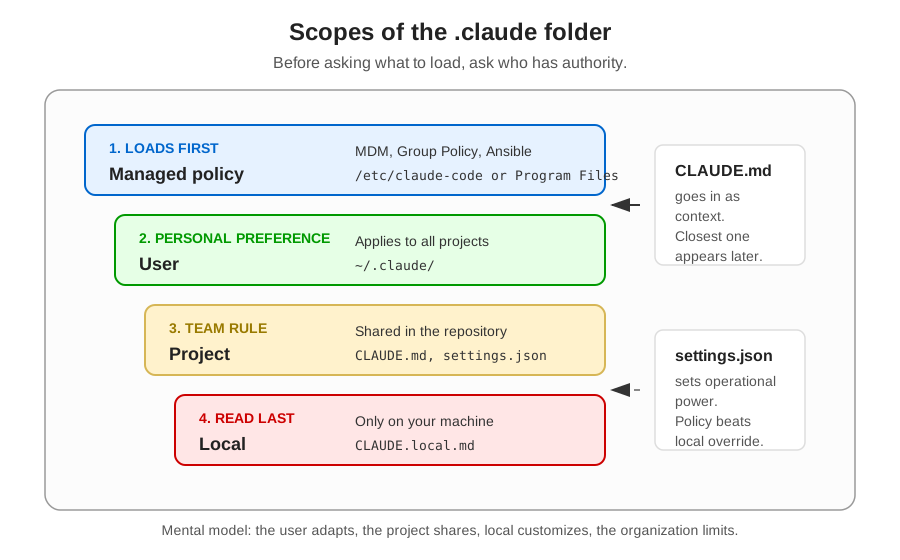 Figure 1: The four main scopes of Claude Code configuration. The important point is separating what guides the model from what the tool actually enforces.
The loading order of instructions goes from the broadest to the most specific. The practical consequence is beautiful: you can have global principles, team rules, and local preferences without stuffing everything into the same file. The political consequence also matters: instructions managed by the organization are not something the user turns off when they become inconvenient. Adult life comes for everyone, prompt engineering included.
The Second Question: Does This Guide or Execute?
The most common mistake when using Claude Code is treating every file in the folder as if it were law. They are not. None of them is.
CLAUDE.md, rules, and imports guide the model. They tell Claude how to think about the project. settings.json, permissions, and hooks configure the tool’s behavior. They tell the system what may run, what must ask for confirmation, and what must be blocked.
This difference sounds pedantic until you need it. Writing “always run the tests before finishing” in CLAUDE.md is an instruction. Creating a Stop hook that runs the tests and blocks completion with exit code 2 is operational control. One depends on the model’s adherence. The other depends on the operating system.
Simple rule:
CLAUDE.md and rules/  -> guide the model
settings.json         -> configures permissions and behavior
hooks/                -> executes deterministic controls
skills/ and commands/ -> package reusable procedures
agents/               -> delegate work to specialized contexts
.mcp.json             -> connects external tools to the project
Keep that table. Write it on a piece of paper if necessary. It will be more useful than memorizing the folder tree.
CLAUDE.md: The House Rules
CLAUDE.md is the highest-leverage file in the project. When a session starts, Claude Code reads the relevant instructions and starts using them as working context. It does not turn the file into firmware of the universe. Not yet. It reads, tries to obey, and is generally more efficient and effective when the instructions are concrete.
What goes in there?
Put in build, test, and lint commands. Put in architecture decisions that do not become apparent by looking at three random files. Put in conventions for imports, error handling, naming, and the structure of the main modules. Put in real traps, such as “the tests use a real local database” or “never import anything outside the safe folders”.
What does not go in there?
Do not put in what already belongs to a linter, formatter, or compiler. Do not copy entire documentation. Do not write a philosophical manifesto of the architecture just because you woke up touched by the muses of abstraction. Claude needs operational instruction, not a habilitation thesis hidden in the repository.
That is right, I am talking to you! Yes, I have read your CLAUDE.MD!
The practical recommendation is to keep each CLAUDE.md under two hundred lines. Files that are too large consume context and, worse, make it hard to tell the essential from the decorative. A lean example:
# Project: Atlas API

## Commands
pnpm dev             # development server
pnpm test            # unit tests and light integration
pnpm lint            # ESLint + Prettier
pnpm build           # production build

## Architecture
- REST API in Fastify, Node 20
- PostgreSQL via Prisma
- Routes live in src/routes/
- Use cases live in src/use-cases/

## Conventions
- Input validation with zod
- HTTP responses in the { data, error } format
- Logs always through the src/logger module
- Never expose stack traces to the client

## Beware
- Integration tests use a real local database
- Run pnpm db:test:reset before debugging strange failures
Again, yes. You guessed right. I am working on a project with TypeScript, Node, and so on. Nobody is perfect.
The attentive reader should memorize this: twenty good lines are worth more than two hundred aspirational ones. Engineering has these cruelties. Not even Claude cares about your feelings.
CLAUDE.local.md: Personal Preference Is Not Team Policy
CLAUDE.local.md is for what is yours, not the repository’s. A different test runner. A sandbox URL. A local pattern for opening files. A note that only makes sense on your machine or in your part of the project.
Here lives an important popular imprecision. Saying that CLAUDE.local.md and .claude/settings.local.json are “automatically ignored by git” is too comfortable. The safe behavior is more careful: when Claude Code itself creates these files, it may configure git to ignore them. When you create them by hand, git receives no spiritual enlightenment. Add them explicitly to .gitignore.
CLAUDE.local.md
.claude/settings.local.json
Magic that depends on who typed the file first is not reliable. It is an incident waiting for an opening in the schedule.
Imports and rules/: Permanent Context versus Conditional Context
CLAUDE.md can import other files with @path/to/file. That is great for organization. It is not great for context economy.
If you write:
@docs/api-standards.md
@docs/testing.md
those files come in along with the file that references them. You spread the weight across more places. Sometimes that is exactly what you want, because modularity has its own value. But do not confuse modularity with lazy loading.
A culturally useful application of imports appears when the repository already maintains an AGENTS.md for other agents. Claude Code reads CLAUDE.md, not AGENTS.md. Instead of maintaining two diverging truths, create a small CLAUDE.md with @AGENTS.md and treat the imported file as the shared source. See how meaning is born from context?
To save context, the most interesting instrument is the .claude/rules/ folder, especially when used with path scoping. Rules without paths always load. Rules with paths load when Claude works on files matching the pattern.
---
paths:
  - "src/routes/**/*.ts"
  - "src/use-cases/**/*.ts"
---
# API Rules

- Every handler returns { data, error }
- Request body validation with zod
- Never expose internal error details to the client
- Always log internal errors before responding to the client
Now the API rule does not need to pollute the context when the task is tweaking a React component, writing documentation, or fiddling with CSS. This looks small until you work in a large monorepo, where each folder has its own theology.
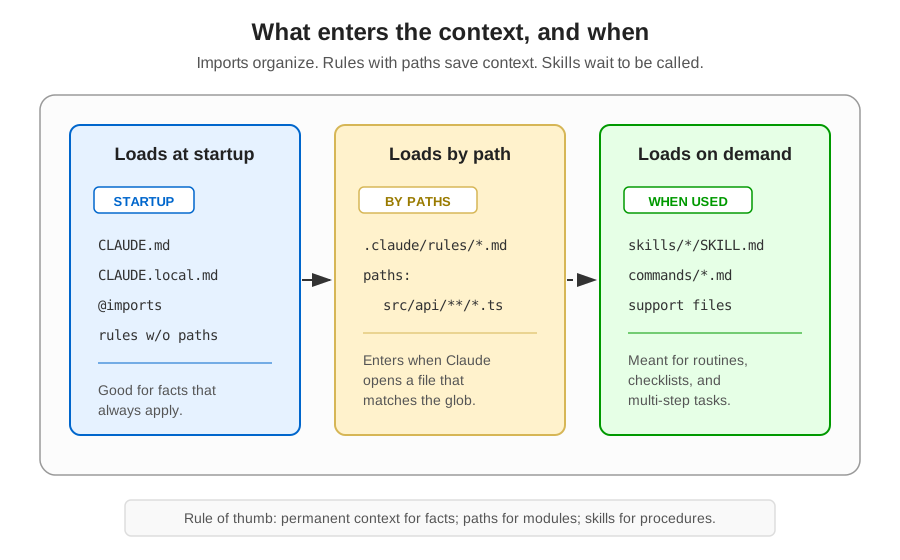 Figure 2: Imports, rules with
 paths, and skills solve different problems. Only scoped rules and skills actually avoid loading everything into the initial context.
The .claude/rules/ folder accepts globs, patterns like src/**/*.{ts,tsx}, and recursive organization. It also accepts symlinks, which lets you keep a common set of rules in one place and reuse it across several projects. There is also ~/.claude/rules/ for personal preferences loaded before the project rules, with lower priority. Project rule beats personal rule. As it should be, because the repository is not your personal diary.
settings.json: Permissions Are Engineering, Not Advice
.claude/settings.json controls permissions, hooks, and an important part of the project configuration. It is where you define what Claude may run without asking, what it must never run, and what falls in between.
A reasonable example:
{
  "$schema": "https://json.schemastore.org/claude-code-settings.json",
  "permissions": {
    "allow": [
      "Bash(pnpm *)",
      "Bash(git status)",
      "Bash(git diff *)",
      "Read",
      "Write",
      "Edit"
    ],
    "deny": [
      "Bash(rm -rf *)",
      "Bash(curl *)",
      "Read(./.env)",
      "Read(./.env.*)",
      "Read(./secrets/**)"
    ]
  }
}
The $schema line gives you autocomplete and validation in editors like VS Code and Cursor. The allow list should be frugal: the project’s execution commands, read-only git, and the file tools that make sense in your workflow. The deny list should block actions you do not want to debate in the heat of a task: destructive commands, direct network access when unnecessary, .env, secrets, and their equivalents.
What is neither in allow nor in deny falls into the healthy territory of asking. That interval is valuable. It avoids the fantasy that you can predict every possible command without turning the file into a detective novel.
A security detail: permissions committed in .claude/settings.json should not silently grant power to a freshly cloned repository. The workspace trust flow exists precisely to prevent a project downloaded from the internet from saying “go ahead, run everything, trust me”. .claude/settings.local.json, on the other hand, is yours, local, and therefore the place for personal exceptions.
Hooks: When You Want Guarantees, Use Shell
Hooks are event handlers. They fire at specific points in the Claude Code flow and execute commands. That sentence alone should command respect, because “executes commands” is the kind of expression that deserves strong coffee, careful review, and prayer.
The most important events are:
PreToolUse: before a tool runs;PostToolUse: after a tool has succeeded;Stop: when Claude thinks it is done;UserPromptSubmit: when the user sends a message;Notification: for alerts;SessionStartandSessionEnd: to prepare or clean up context.
For tool events, matcher narrows the trigger. Bash targets shell commands. Write|Edit|MultiEdit targets file changes. Without a matcher, it matches everything.
The detail that separates security from theater is the exit code:
0 -> success
1 -> error recorded, but non-blocking
2 -> blocks and returns stderr to Claude
Using exit 1 in a security hook is a small tragedy. The script looks angry, puts on its tough face, records an error, and lets the action through. To block, it is exit 2.
A typical configuration:
{
  "hooks": {
    "PreToolUse": [
      {
        "matcher": "Bash",
        "hooks": [
          {
            "type": "command",
            "command": "$CLAUDE_PROJECT_DIR/.claude/hooks/bash-guard.sh"
          }
        ]
      }
    ],
    "PostToolUse": [
      {
        "matcher": "Write|Edit|MultiEdit",
        "hooks": [
          {
            "type": "command",
            "command": "$CLAUDE_PROJECT_DIR/.claude/hooks/format-touched-file.sh"
          }
        ]
      }
    ]
  }
}
The bash-guard.sh can read the JSON from stdin, examine the command, and block patterns like rm -rf /, git push --force main, or DROP TABLE. The formatter can run after edits. The Stop hook can run tests and prevent Claude from declaring victory with a red suite.
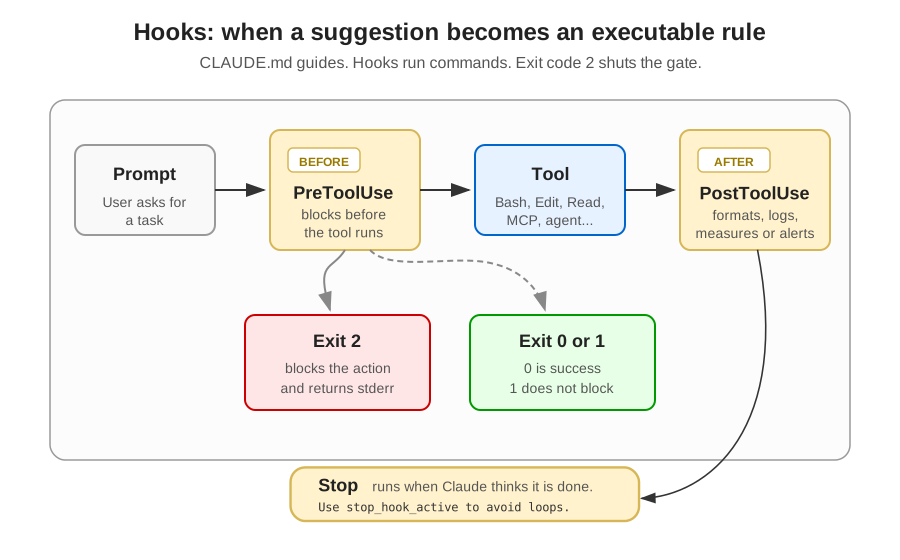 Figure 3: Hooks place control points outside the model’s good will. To actually block, the script must exit with code 2.
There is a special trap in Stop: check stop_hook_active in the payload. Without it, the hook may block, Claude tries to fix things, the hook blocks again, and you have invented a perpetual motion machine powered by frustration. On the second attempt, let it stop.
Hooks do not reload mid-session. PostToolUse undoes nothing, because the tool already ran. Hooks also fire for subagent actions. And, above all, they execute with your user permissions, no magical sandbox. Validate JSON, use absolute paths, and quote your shell variables. A badly written hook is automation with teeth.
To debug instruction loading, there is also the InstructionsLoaded event. It is useful when a rule with paths does not appear at the moment you expected, or when the project has too many layers and you no longer know which file is whispering in the model’s ear.
Be careful with hooks. This week, I helped a company with an unusual problem: there was a line with
git restore .in a shell file that ran only when a specific hook fired. It took me hours to understand what was wrong. Imagine what else is out there.
Reusable Capabilities: Commands, Skills, and Agents
After instructing and controlling, comes the third problem: reusing procedures. This is where commands, skills, and agents come in.
Custom commands are explicit shortcuts. Markdown files in .claude/commands/ become slash commands. A file .claude/commands/review-issue.md can become /review-issue. It is a good place for recurring prompts and small work rituals.
Skills are stronger. Each skill lives in its own folder, with a SKILL.md and, if necessary, auxiliary files:
.claude/skills/
├── security-audit/
│   ├── SKILL.md
│   └── checklist.md
└── release/
    ├── SKILL.md
    └── templates/
        └── notes.md
A SKILL.md has frontmatter describing when to use that capability:
---
name: security-audit
description: Security audit of code, permissions, and configuration.
allowed-tools: Read, Grep, Glob
---
Review the codebase looking for:

1. exposed credentials;
2. authentication and authorization flaws;
3. SQL injection and XSS risks;
4. insecure configurations.

Use @checklist.md as internal reference.
The useful distinction is not “command versus skill”, as if they were rival religions. It is single file versus package. The command solves a shortcut. The skill packages a procedure, attachments, and triggering criteria. Personal skills live in ~/.claude/skills/.
Agents are something else. An agent in .claude/agents/ defines a specialized persona, with its own prompt, allowed tools, and model preference:
---
name: code-reviewer
description: Senior reviewer focused on bugs, edge cases, and maintainability.
model: sonnet
tools: Read, Grep, Glob
---
You review code with a focus on correctness.

When reviewing:
- point out bugs before style;
- mention edge cases;
- suggest concrete fixes;
- only discuss performance when it matters at scale.
When invoked, the agent works in its own context and returns a summary. This avoids polluting the main conversation with thousands of exploration tokens. The tools field matters: an auditor that only needs to read should not write. An agent with less power is easier to trust. There is a sentence that also holds outside computing.
MCP: The .claude Folder Does Not End at the .claude Folder
Guides about .claude tend to forget MCP. It is a big omission, because the Model Context Protocol is the official way to connect Claude Code to external tools: GitHub, databases, browsers, internal documentation, task systems, and whatever else makes sense.
The project configuration normally lives in .mcp.json, at the root:
{
  "mcpServers": {
    "github": {
      "command": "npx",
      "args": ["-y", "@modelcontextprotocol/server-github"],
      "env": {}
    }
  }
}
This file is part of the project’s contract. Without MCP, you are teaching Claude to work better inside the repository. With MCP, you are declaring which external systems it may connect to. It is another class of power, and therefore another class of responsibility.
With great power comes…
Automatic Memory and the /memory Command
Beyond what you write, Claude can also accumulate project memory. It records discovered commands, observed patterns, recurring decisions, and other notes that seem useful for future sessions.
The important place is ~/.claude/projects/<project>/memory/:
~/.claude/projects/<project>/memory/
├── MEMORY.md
├── debugging.md
├── api-conventions.md
└── ...
MEMORY.md works as a compact index. Topic files can be read on demand. The directory is local to the machine and derived from the project. This explains that curious moment when Claude seems to remember something you did not say in the current conversation.
The /memory command is the flashlight for that basement. It helps list loaded instruction files, open memory, edit notes, and understand where certain recollections came from. When the tool seems haunted, it is often just documented somewhere you forgot to look.
Monorepos: When the Root Is Not Enough
In a monorepo, the root is rarely the whole truth. A frontend package, a backend service, and a shared library can have very different rules.
You can use CLAUDE.md and .claude/rules/ in subdirectories to load specific instructions when Claude works in that specific area of the project. This keeps the context cleaner and prevents the payments package’s conventions from contaminating the editing of a visual component.
There is also claudeMdExcludes, useful when you want to prevent certain CLAUDE.md files above the current directory from being loaded. In general, put it in your .claude/settings.local.json, because context exclusion is usually a local preference:
{
  "claudeMdExcludes": [
    "**/monorepo/CLAUDE.md",
    "/home/user/monorepo/other-team/.claude/rules/**"
  ]
}
The caveat is important: managed policy does not join this game. What the organization imposes remains imposed.
The Complete Map
Putting the pieces together:
your-project/
├── CLAUDE.md                  # team instructions
├── CLAUDE.local.md            # personal preferences
├── .mcp.json                  # project MCP servers
│
└── .claude/
    ├── settings.json          # permissions, hooks, configuration
    ├── settings.local.json    # personal overrides
    │
    ├── rules/                 # modular instructions
    │   ├── code-style.md
    │   ├── testing.md
    │   └── api-conventions.md
    │
    ├── hooks/                 # scripts referenced by settings.json
    │   ├── bash-guard.sh
    │   ├── format-touched-file.sh
    │   └── enforce-tests.sh
    │
    ├── commands/              # slash commands
    │   └── review-issue.md
    │
    ├── skills/                # packaged procedures
    │   └── security-audit/
    │       └── SKILL.md
    │
    └── agents/                # specialized subagents
        ├── code-reviewer.md
        └── security-auditor.md

~/.claude/
├── CLAUDE.md                  # global personal instructions
├── settings.json              # global settings
├── commands/                  # personal commands
├── skills/                    # personal skills
├── agents/                    # personal agents
└── projects/                  # history and automatic memory
This map should not become an anxiety checklist. Have I mentioned your ADHD yet? You can leave the OCD at home too. Not every project needs everything. In fact, most do not.
A Practical Sequence to Start
If the curious reader is starting from scratch, she can try the following:
First, run /init and let Claude generate an initial CLAUDE.md. Then cut without mercy. The goal is not to preserve everything the tool wrote; it is to reach the essential.
Second, create .claude/settings.json with minimal permissions. Allow build, test, and lint commands. Deny .env, secrets, and destructive commands. Let everything else ask for confirmation.
Third, add one small, useful hook. The best candidate is usually a PostToolUse that formats touched files or a Stop that runs tests. Start simple. Performative security on day one becomes decoration.
Fourth, when CLAUDE.md starts gaining weight, move specific rules to .claude/rules/ with paths. That is the moment you stop paying permanent context for instructions that only apply to one part of the code.
Fifth, only create skills and agents when there is real repetition. If you review security every week, package it. If you did it once as a test, breathe and go drink some water.
Sixth, use MCP when there is an external tool that is actually part of the work. Do not connect the entire universe just because the acronym is pretty.
What Remains
The .claude folder is a working protocol between people, repository, and agent. It tells Claude who the project is, which rules matter, which actions are allowed, and which capabilities are available. When well configured, it reduces repeated conversation. When badly configured, it automates confusion with admirable confidence.
Two ideas deserve to survive. First: CLAUDE.md is the beginning, not the end. It guides, but does not guarantee. Second: security and quality need to leave prose and enter executable configuration when the risk justifies it. Instructions are useful. Hooks and permissions are another game.
Start small, refine along the way, and treat the folder as infrastructure. Not as tool fetish. The difference between those two states is the difference between a team that uses Claude Code with clarity and a team that merely accumulated mystical files in YAML and Markdown.
Language
I wrote the original of this text and all the examples in Portuguese. Do not use Portuguese. There are a few dozen articles indicating that AI assistants use up to 70% more tokens in Portuguese.
If that is true, it is a tax we are paying for the language of Rubem Braga and Fernando Pessoa. I do not know whether it is true. Little old me, standing here barefoot, ran no benchmark whatsoever.
But, just in case, I would rather write broken English than pay more.
Delete your claude.md every three months, more or less. The model changes, your instructions don’t. If you don’t start over, these instructions will work against you.
References
-
PACHAAR, Akshay. Anatomy of the .claude/ folder. X Articles, 2026. Available at: https://x.com/akshay_pachaar/status/2035341800739877091. Accessed on: July 4, 2026.
-
ANTHROPIC. Explore the .claude directory. Claude Code Docs. Available at: https://code.claude.com/docs/en/claude-directory. Accessed on: July 4, 2026.
-
ANTHROPIC. How Claude remembers your project. Claude Code Docs. Available at: https://code.claude.com/docs/en/memory. Accessed on: July 4, 2026.
-
ANTHROPIC. Claude Code settings. Claude Code Docs. Available at: https://code.claude.com/docs/en/settings. Accessed on: July 4, 2026.
-
ANTHROPIC. Hooks reference. Claude Code Docs. Available at: https://code.claude.com/docs/en/hooks. Accessed on: July 4, 2026.
-
ANTHROPIC. Extend Claude with skills. Claude Code Docs. Available at: https://code.claude.com/docs/en/skills. Accessed on: July 4, 2026.
-
ANTHROPIC. Create custom subagents. Claude Code Docs. Available at: https://code.claude.com/docs/en/sub-agents. Accessed on: July 4, 2026.
-
ANTHROPIC. Connect Claude Code to tools via MCP. Claude Code Docs. Available at: https://code.claude.com/docs/en/mcp. Accessed on: July 4, 2026.
-
ANTHROPIC. Commands. Claude Code Docs. Available at: https://code.claude.com/docs/en/commands. Accessed on: July 4, 2026.
(Updated: )